%20-%20DONKERGROEN%20(2).png)
.png)
How to use the Harvia Xenio panel
With the Harvia Xenio control panel, you can easily control your sauna, including temperature, time and lighting.
With the Harvia Xenio control panel, you can easily control your sauna, including temperature, time and lighting.
1. Before you start
When the control panel is connected to power and the main switch is on:
- The panel is in standby mode
- The backlight on the on/off button is lit
- The system is ready to use
Please note: Always make sure there are no objects on or near the stove before turning it on.
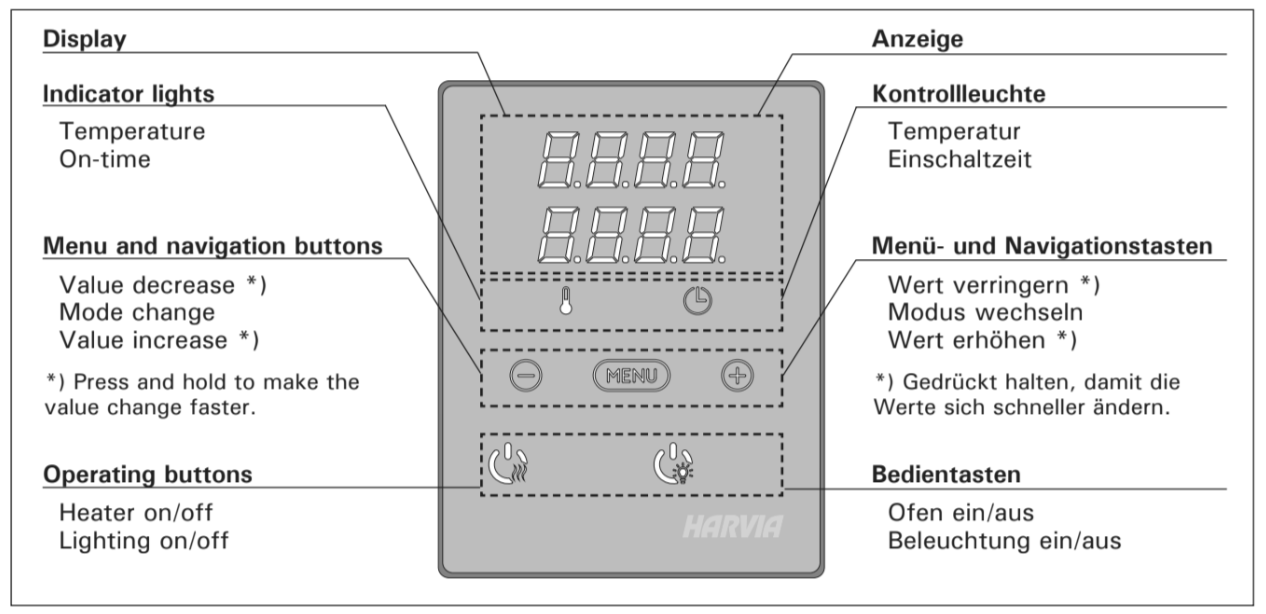
2. Enable the sauna
- Press the heater on/off button
- The sauna starts immediately
What happens next:
- The display briefly shows:
- set temperature
- set time (approx. 5 seconds)
- The sauna starts with warming up
Once the set temperature has been reached:
- The heater switches automatically on and off to keep the temperature stable
⏱️ On average, it takes about 1 hourdepending on the sauna.
3. Switch off the sauna
The heater switches off when:
- You on the on/off button presses
- The set time has elapsed
- A failure occurs
After switching off, the system returns to standby mode.
⚠️ Always check that the heater is actually switched off.
4. Adjust settings
From the menu, you can change settings such as:
- Temperature
- Switch-on time
Here's how to do it:
- Press the menu button
- Use:
- + to increase
- - to lower
- Confirm or go to the next setting using the menu button
Settings are automatically saved and are saved for the next time.
5. Control lights
The sauna lighting works separately from the stove.
- Press the light switch to turn lights on or off
- Maximum power: 100 W
6. Important tips
- Never leave the sauna on unattended
- Always keep the area around the stove clear